Rickrack
A native Mac studio for AI image generation, built in Rust with GPUI and SQLite, with area edits, version history, and side-by-side model comparison.
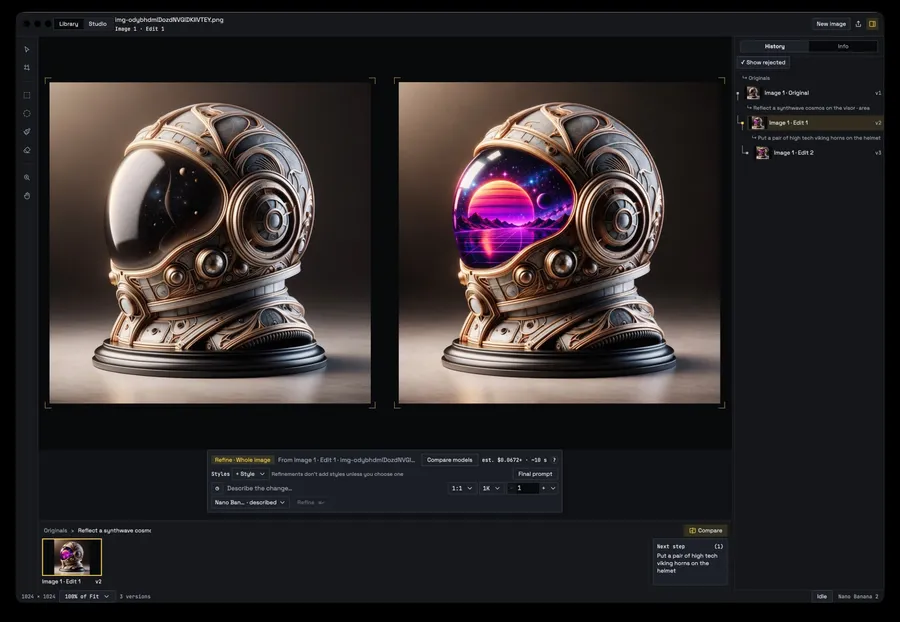
Why I Made It
Image models keep getting better, but the way we use them hasn’t. A chat window is fine for a quick image. It falls apart once you need precise, iterative work: fixing one hand, trying three directions, or remembering which prompt produced the version you liked.
I spent years as a designer working in tools built for exactly that kind of work. Rickrack gives image models a proper studio, with the tools to finish what the prompt started. It’s in development for macOS, and you can request early access to the open beta.
Product Decisions
Edit the part that’s wrong. Paint, draw a rectangle, or draw an ellipse over an area and describe the fix. Area tools only appear for models that support them. Cropping, rotating, and flipping happen locally and don’t cost a request.
Every edit is a new version. Each result is saved as a child of the image it came from. You can branch from any version, go back to an earlier one, or compare a result with its parent.
Generate several, keep the best. Ask for up to four results and sort them on a contact sheet: pick, star, or reject. Compare Models sends one prompt to two to four models and lays the results side by side.
Your keys, your files. Add a key for OpenAI, Google, or xAI and pay them directly. Rickrack keeps a running estimate of the month’s spend and saves the full-quality file each provider returns.
No hidden prompts. Saved styles go into any prompt with /name, and the full composed prompt is always visible. Every saved image records the exact styles and settings that made it.
Engineering Decisions
Native, not a web view. Rickrack is written in Rust with GPUI, the GPU-accelerated UI framework behind the Zed editor. A shared core crate owns validation, masks, provider requests, SQL, credentials, and file rules. The desktop crate only handles presentation.
Originals on disk, history in SQLite. Each provider’s exact PNG, JPEG, or WebP is stored as a file the app owns. A SQLite catalog tracks metadata and lineage, and thumbnails are disposable cache. Reads, edits, and exports always start from the original.
One catalog for six models. Each model declares what it supports: area edits, ratios, quality levels, and advanced controls. The interface reads those declarations, so adding a model doesn’t mean rewriting screens.
One request at a time. Activity runs a single request and queues up to 20 more. Stopping the queue keeps every result that already came back.
How a Request Moves Through the App
Prompt bar
prompt, styles, result count, and an optional area
Model catalog
route by capability and estimate the cost
Activity queue
one request at a time, up to 20 waiting
Provider
OpenAI, Google, or xAI
your own API keySave
original file plus lineage in the SQLite catalog
Contact sheet
pick, star, or reject results
Version history
branch, revisit, or compare with the parent
Library
searchable families, names, and labels
Hard Parts
Starting over in a new stack. The first version was built with React, Tauri, and Bun. I rebuilt it as a shared Rust core with a native GPUI interface and retired the old stack completely.
Never losing an image you paid for. Every request costs money, so a crash or a quit can’t drop a result. Writes and cleanups record their intent first, and the app reconciles interrupted work on the next launch. Batch sizes and uncertain resubmissions are guarded, so a retry doesn’t quietly pay twice.
Upgrading a library people care about. Schema migrations only run after an integrity check and a verified backup of the catalog. Unknown versions are refused without touching anything.
What’s Next
- Open beta — signing, notarization, and the first public build for macOS.
- Windows and Linux — new editions after the Mac release.