Migraine Control
A private, local-first migraine tracker designed for fast logging during an attack and useful, doctor-ready reporting afterward.
What It is
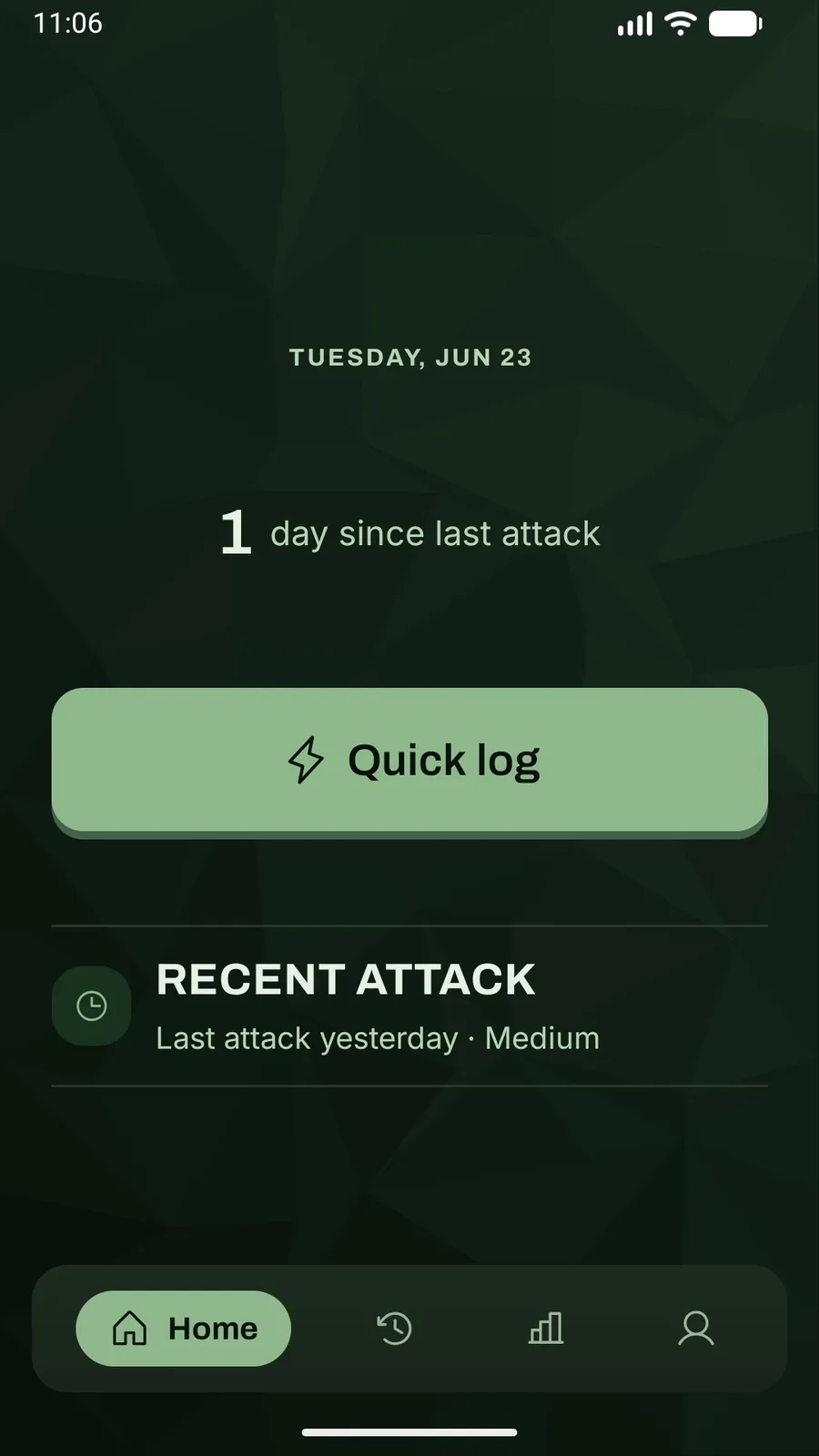
Migraine Control is a migraine tracker built around a simple idea: the app has to be easiest to use when a migraine sufferer is in the beginning or middle stages of an attack.
It lets migraineers record the start and severity of an attack in seconds, come back for the details later, and turn their history into useful patterns and doctor-ready reports.
The core experience works offline, without an account. Migraine Control is available on Google Play as a one-time purchase, with no ads or subscriptions.
Why I Built This
I live with migraine myself, so I was not designing around a hypothetical user. I wanted to build the tracker around the reality of having a painful episode, instead of asking the user to work around it. I grew tired of making do with existing migraine apps that missed the features I cared about the most.
Logging the minimum should be immediate. Adding context should remain possible when the attack is over. The data should stay useful without turning the product into a diagnostic tool or requiring people to hand sensitive health information to another account-based service.
My Goals
The first goal was to reduce the friction between “a migraine is starting” and a saved record.
The second was privacy by architecture. Migraine Control stores health data on the device by default, works without a network connection, and makes Cloud Sync an explicit, optional choice rather than the price of admission.
The third was to make the accumulated data genuinely useful. A diary matters when it helps someone remember what happened, spot recurring signals, and communicate more clearly with a clinician.
Product Decisions
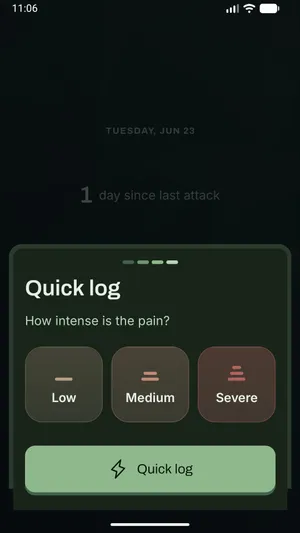
Quick Log before complete forms A single tap starts the timer for tracking an ongoing attack. The user can end it anytime, and either add details immediately or later. That preserves the most time-sensitive facts without demanding endless screens in between.
Structured detail without forcing it The full editor covers pain areas, symptoms and impact, possible triggers, relief, and freeform notes. Medication, alternative relief, and triggers are customizable and reusable, so repeated entries get faster rather than more tedious.
History first, interpretation second A chronological list and calendar make the raw record inspectable. Reports then summarize the last 30 days without presenting correlations as medical conclusions.
A low-glare visual system The interface is dark by design, using deep green-black surfaces, large touch targets, and restrained motion. The visual language stays calm and avoids the bright white surfaces that are especially hostile during light-sensitive attacks.
No account required The app opens directly into the tracker. Cloud Sync is available from Settings for people who want continuity across devices, but the local product remains complete without it.
Technical Decisions
Expo, React Native, and Expo Router A single TypeScript codebase supports Android, the upcoming iOS release, and a web implementation where platform behaviour differs. Expo Router keeps screens and API routes explicit, while focused platform files handle native and web storage details without spreading conditionals through the product code.
Tamagui as the design-system layer Shared tokens, themes, and primitives keep the low-glare interface consistent while still allowing native accessibility behaviour. Archivo gives headings a distinct voice; Inter keeps dense health information readable.
A repository boundary around health data Screens and state do not depend directly on a database driver. They talk to a HealthRepository contract, with embedded Turso/libSQL. That boundary keeps local-first behaviour central and makes storage replaceable and testable.
The server is a sync control plane, not the health API The API only manages authentication, provisioning, and account deletion, which keeps the everyday tracking path fast and independent of server availability. Better Auth handles email one-time codes, Amazon SES delivers them, and the backend provisions a per-user Turso database with a scoped token.
Derived reports stay local Metrics, PDF reports, and CSV exports are computed from the device’s own data. The app doesn’t need to upload a health history just to show the user their own patterns.
How an Attack Moves Through the App
Quick Log
choose severity and save the attack start
Local repository
persist immediately on the device
embedded Turso on native, IndexedDB on webOngoing attack
live timer with an explicit End Attack action
details can be added now or laterEntry editor
timeline, pain, symptoms, triggers, medication, relief, notes
History + calendar
inspect individual attacks and patterns over time
Reports + exports
30-day signals, doctor PDF, and CSV
Optional Cloud Sync
encrypted continuity across signed-in native devices
off by defaultUseful record
information the user controls and can take to a clinician
Biggest Challenges
Making “fast” survive edge cases. Attack timers get complicated when entries cross midnight, start times change, the app resumes, or an older attack is still open. Keeping those rules in the domain layer lets Quick Log stay simple without compromising the data.
Keeping sync truly optional. The challenge was adding cross-device sync without letting authentication creep into the core experience. I isolated sync behind its own opt-in workflow, status, and recovery paths, leaving tracking and reports fully functional without an account.
Designing for a hostile usage environment. During a migraine, even a polished interface can become painful. The challenge was carrying the same low-glare, low-friction approach through every interaction so the app remains usable when light, motion, and concentration are hardest to tolerate.
Testing a stateful health diary. The important failures are rarely isolated events; they unfold as sequences. I designed the testing strategy around these complex scenarios, combining focused unit tests with end-to-end Maestro flows.
What’s Next
- iOS release — the native experience is implemented and undergoing the final App Store release work.
- German and French localization — the locale slots are reserved, with full translations planned for a future release.
- Documentation reconciliation — bring release checklists and supporting docs back in line with the production app as Android and iOS milestones move at different speeds.
- Deeper longitudinal reporting — expand useful pattern views without crossing the line into diagnosis or overstating what a correlation means.